
01
Knowledge
One authoritative project structure, a vault of stakeholders, teams and project summaries, and retrieval notebooks over the source documents. Context survives, not just files.
BarichellaBRAIN OS
Paolo Barichella's Infinite Brain.
BRAIN OS is an agentic AI platform built on one body of work: Paolo Barichella's method for food design, hospitality concept creation and food service engineering. Developed and owned by Food Lifestyle Consulting QFZ LLC.
In development
Overview
What it is
Twenty-four years of Food Design and Hospitality Concept Creation have been digitised: processes, decision criteria, technical standards, project archives, failures worth remembering. Paolo Barichella has transferred that know-how into BRAIN OS and used it to train a specialised network of AI agents.
The agents do not replace the designer — they work alongside him. Each one draws on an exclusive, secured Shared Agent Memory (SAM): a cognitive memory that keeps every project, standard and precedent available to every agent at once. What used to live in one head and forty archive boxes now answers a question in seconds.
The output is not text. It is project material — zoning studies, service flows, equipment specifications, format economics, concept documents — produced to the same standards the studio has always applied, and always reviewed by a human before it leaves the system.
The value of the system is formally recognised and capitalised. The “Heritage” intangible assets transferred into the platform — know-how, expertise, IPR, goodwill, trade secrets and copyright — have been converted into digital tokens held by Food Lifestyle Consulting QFZ LLC, sole owner of the platform.

Architecture
BRAIN OS is not a chatbot with a good prompt. It is three planes that stay separate on purpose: what the practice knows, what reasons over it, and what actually does the work — with a human signature between the system and the client.
01
One authoritative project structure, a vault of stakeholders, teams and project summaries, and retrieval notebooks over the source documents. Context survives, not just files.
02
Thirty-one specialised agents — from operations and project management to legal, finance, creative direction and systems — plus two bridges that connect them to the wider toolset.
03
The agents do not only advise. Automations, connected business tools and meeting capture turn a decision into a task, a document, a drawing or a brief that lands where the team already works.
04
An agent never holds knowledge natively — it knows where to ask. Requests above a defined threshold pass a plan gate; low-confidence answers escalate to Paolo. Nothing reaches a client unsigned.
Inside the system
A scientific committee of the highest order — illustrious and multidisciplinary — permanently on call inside BRAIN OS. It gathers the thinking and the working method of forty-nine of the great masters of their disciplines — from Michael Porter to Henry Ford, from Pierre Bourdieu to Steve Jobs — across eleven domains, each distilled into a lens you can question.
What would he have done?
What would he have said?
How would he have thought it through?
What advice would he give me?
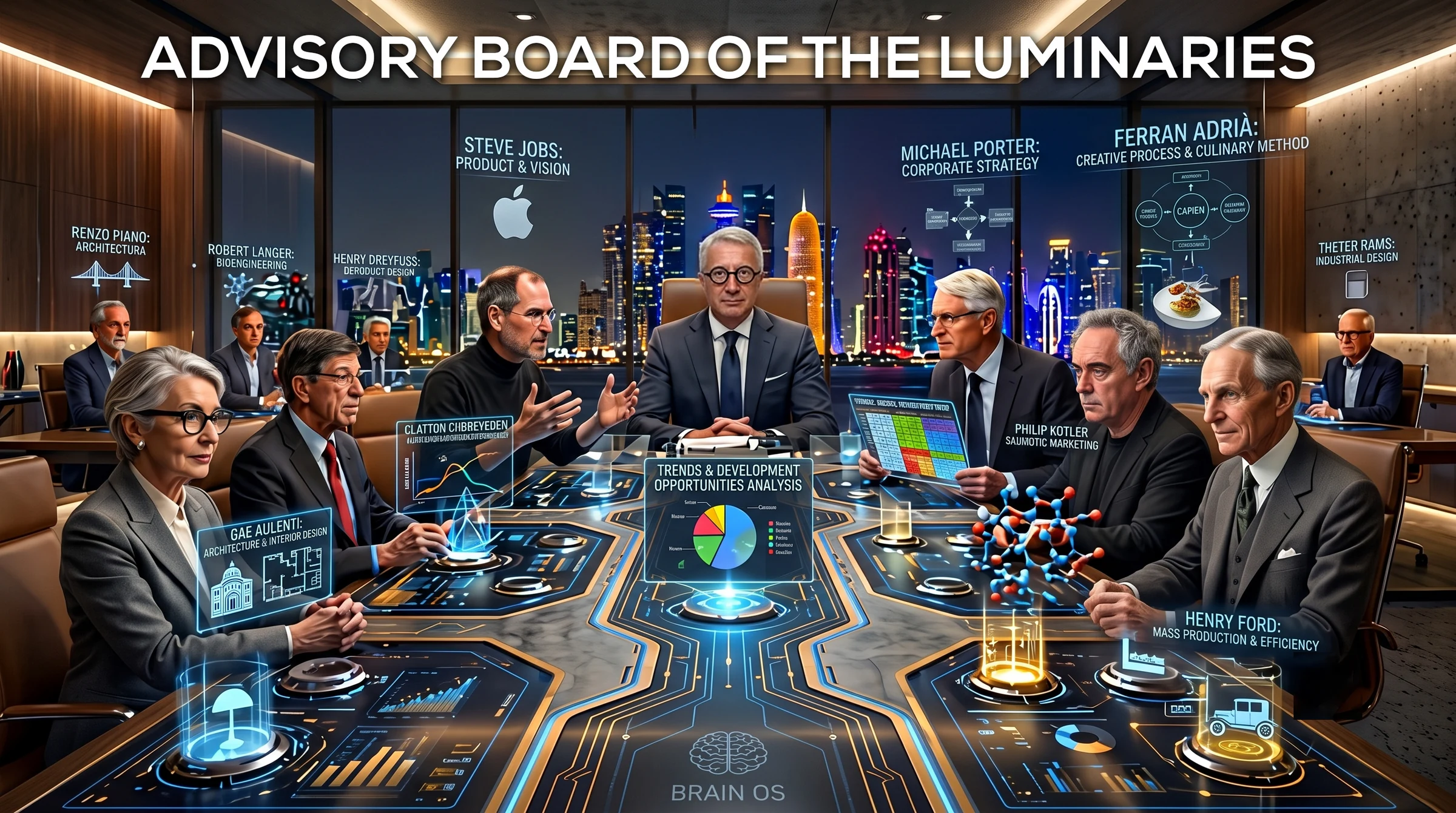
For every master, two artefacts: the lens — how he reasons, the questions he asks first, the criteria he weighs most, the anti-patterns he hunts, the cases where the lens should not be used, and his canonical sources — and an SOP that turns that method into numbered, applicable steps.
No lens speaks from the model's general memory. Summon Byron Sharp and what answers is his codified framework, not a vague notion of what someone in marketing might say. That single rule is the difference between an authentic distillation and a plausible caricature.
Two or three lenses are convened precisely for their structural disagreement — Godin's vision against Sharp's evidence, Adrià's ambition against Marchesi's subtraction, Ford's standardisation against Jobs's product view. Each argues its position; the strategist then synthesises the debate and states the trade-offs.
Some disagreements come round again and again, so they are kept ready as clusters: kitchen, front of house, positioning, menu and culture, industrialise versus artisanal, product versus evidence. One click convenes the right table.
The decision stays yours, and it gets recorded. Each saved decision feeds the committee's self-improvement loop, so the lenses sharpen against your real context — clients across Italy and Qatar, your constraints, your history: the one thing none of these masters ever had.
Richard Rumelt · Michael Porter · Clayton Christensen · Hamilton Helmer
Byron Sharp · Seth Godin · April Dunford · Philip Kotler
Danny Meyer · Will Guidara · Ferran Adrià · Gualtiero Marchesi · Auguste Escoffier · Pellegrino Artusi
Renzo Piano · Dieter Rams · Don Norman · Ilse Crawford · Achille Castiglioni · Gae Aulenti · Jasper Morrison · Le Corbusier
Robert Langer · Frances Arnold · George Church · Jennifer Doudna
Harold McGee · Hervé This · Nathan Myhrvold · J. Kenji López-Alt
Pierre Bourdieu · Erving Goffman · Ray Oldenburg · Zygmunt Bauman
Clifford Geertz · Mary Douglas · Claude Lévi-Strauss · Marc Augé
Ernst Neufert · Henry Dreyfuss · Niels Diffrient · Stephen Pheasant
Étienne Grandjean · Alphonse Chapanis · James Reason · Erik Hollnagel
Henry Ford · Sergio Marchionne · Steve Jobs
Source consultation · not a lens
Compliance is deliberately not one of the forty-nine lenses. A lens is a way of reasoning; a regulation is not something to reason your way around. So the rules sit in their own category — a body of roughly twenty-three official sources on professional kitchen design, queried directly by the committee and by CAD Studio.
It answers with the official reference, not a paraphrase: the clause, the standard, the code of practice. In an inspection an opinion is worth nothing and a reference is worth everything.
The corpus is assembled by a dedicated deep-research routine, which can be re-run for any new market: a different city, a different authority, the same discipline.
What the corpus covers
International
Qatar
Gulf
Engineering & services
Fire protection
Design practice
Concept illustration. The figures named are historical references whose published method is used as a disciplinary lens inside an internal review protocol: none of them, nor their estates, are affiliated with, endorse or advise Paolo Barichella, Food Lifestyle Consulting QFZ LLC or BRAIN OS.
The surface
Everything above has one place where it is actually operated. Not a dashboard of charts — a working surface: the morning glance, the project hierarchy, the people, the agents, and the actions that follow from them.
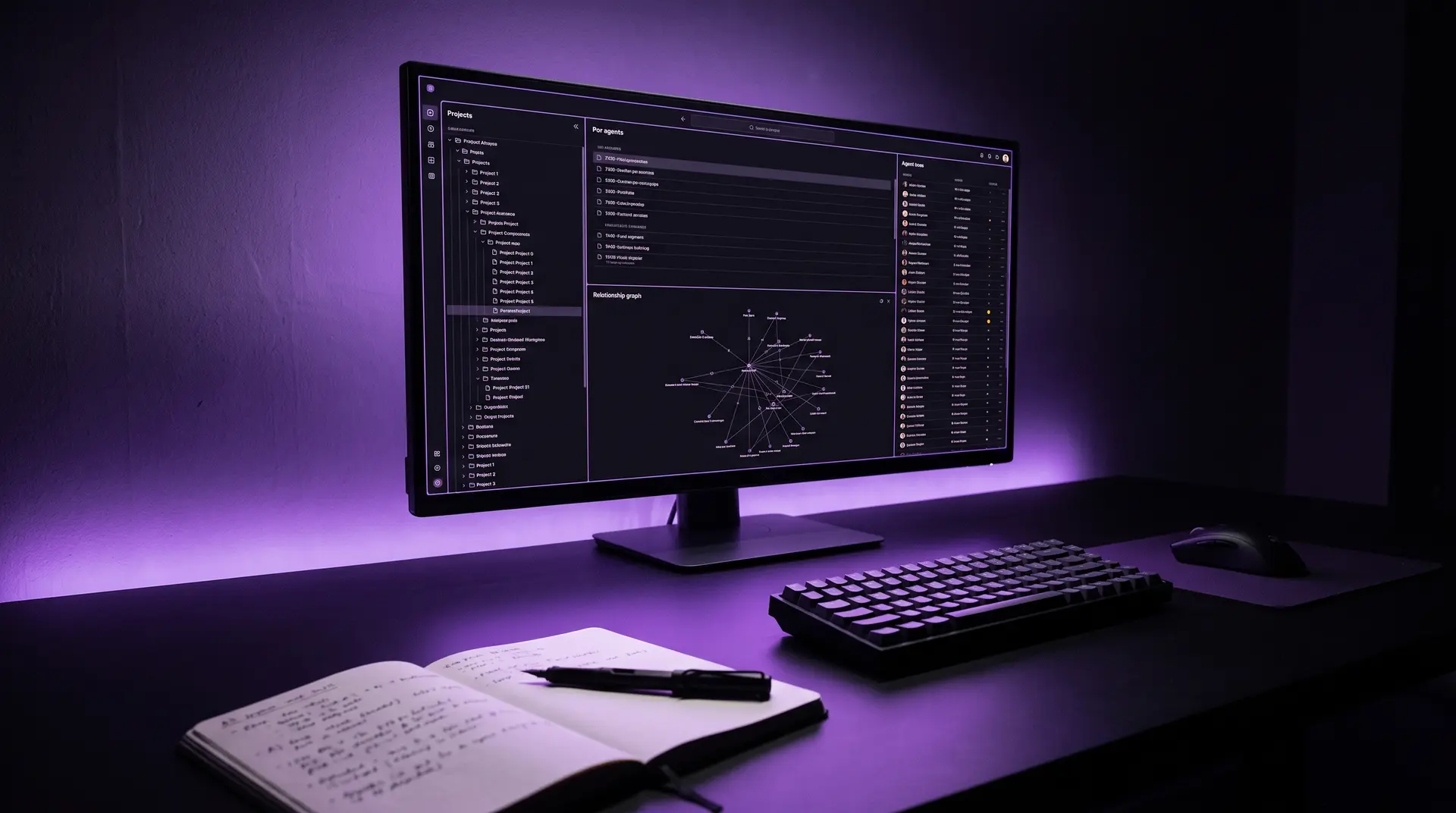
Active projects and archive at a glance, the week's agenda, the relationships that need reconnecting — and operational gaps: any project missing a stakeholder, a notebook or a folder.
The whole hierarchy as a tree or a sortable table. Open one and a side panel gives its summary, budget, team with defined responsibilities, channels and open tasks.
Each agent exists at once as execution, as knowledge and as material. The Cockpit shows all of its incarnations in one card, so you always brief the same entity.
Relationship strength, an interactive graph of who holds several projects together, and three lenses: gaps, follow-ups gone quiet, and partnership openings between projects that share a stakeholder.
A notetaker joins the call and transcribes in Italian or English. One action turns the transcript into minutes — attendees, decisions, action items — and one click turns those into real tasks.
A private area reached with a personal link and a PIN, no account needed, showing only that client's own project folder — plus the team and modules working on it. Confidential folders are never exposed.
Project management
Every client, venture or internal area is an entity; beneath it sit projects and sub-projects. The Project Management Engine keeps each of them in step across five levels that used to drift apart — held together by a permanent key, so nothing breaks when a folder is renamed.
Every node that matters has a short, permanent code bound to the ID of its folder, not to its name. Rename anything and every link holds. A code, once used, is never reused.
A single folder for each client or venture, with the same structure everywhere: working materials, a curated selection for the notebooks, and a reserved area that is never indexed.
Retrieval runs over a curated selection, not over the whole archive: the latest version of each document, minutes and contracts always, fifteen to twenty-five sources per node.
The conversational memory sits at entity level and is fed with the same curated documents, so a question about any sub-project is answered with the history of the whole relationship.
Task lists carry the node's code and execute the structure above them. A list can no longer create a project by accident, and a service folder can never hold one.
Role, organisation, projects held, channels and relationship history in a single record — fed by meetings, e-mail and a business card scanned on site.
Every project states its team with defined responsibilities, so the person accountable for a decision is never a guess.
Stalled follow-ups, projects missing a stakeholder, relationships that need reconnecting — flagged before they turn into a problem.
A stakeholder can be given a private portal with only their own project and only the modules they need. Nothing else is ever exposed.
The command chain is fixed: Paolo decides, the system orchestrates, the registry keeps the links, the archive keeps the files — and the interfaces show the state of a project, they never create it.
Modules
The first vertical in operation: an app inside the system, covering the whole of professional kitchen design — from a floor plan or a sketch on paper to HACCP layout, services, quote and render.
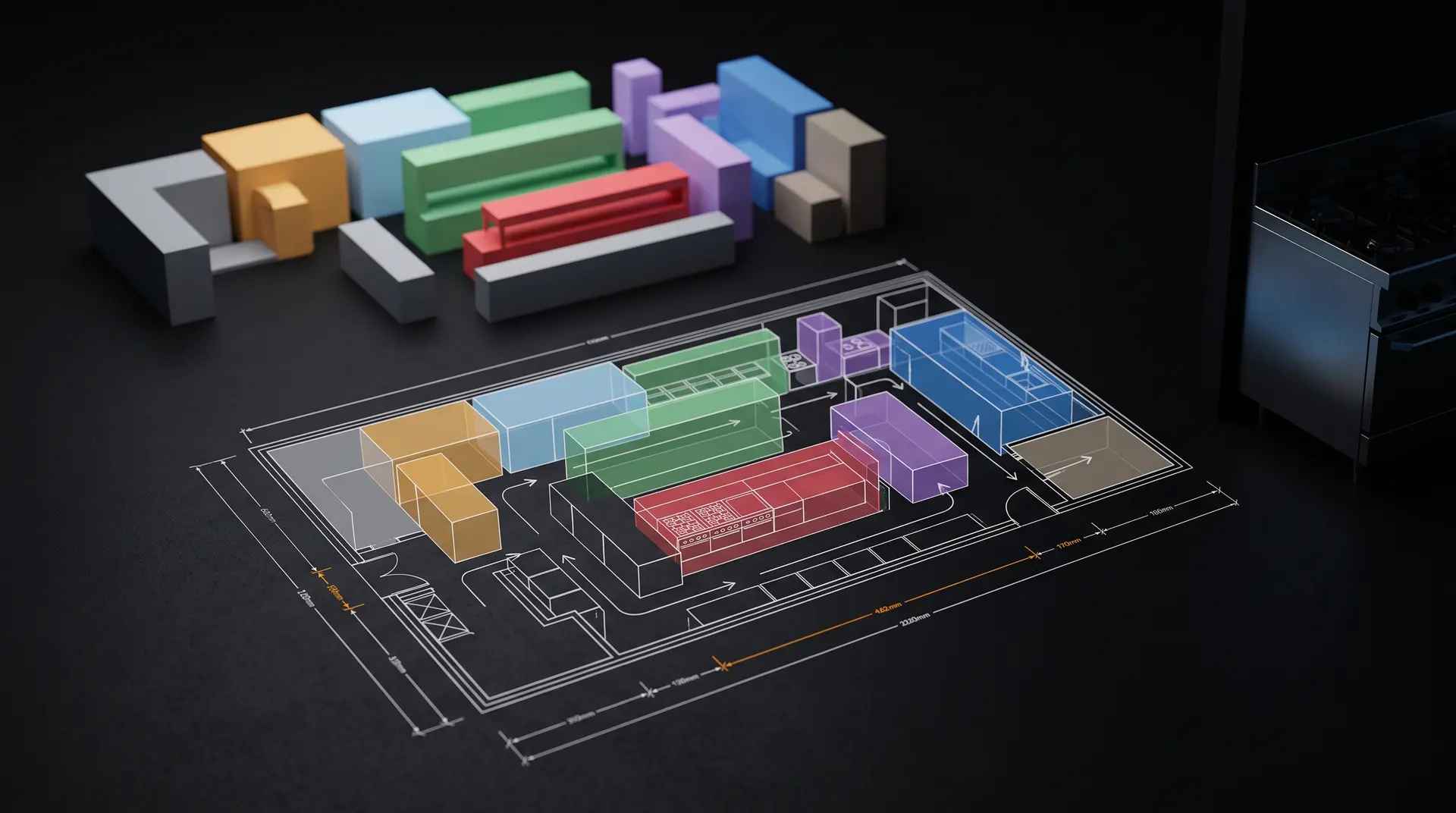
Kitchen Architect is the agent: it holds the HACCP rules, the ergonomic standards and the real equipment dimensions, and it decides. CAD Studio is the design module that lives inside it — the part that draws, models, prices and renders, with the regulatory check built in rather than bolted on.
Nobody moves a mouse. Geometry is generated as code — parametric, in millimetres, repeatable. And the real plan is always the base: the landlord's drawing, or your own sketch. The envelope is never invented.
A floor plan as image or PDF, a vector drawing, or a hand sketch: the system reads the dimensions written on it, rebuilds the footprint and the rooms in metres, and seeds the layout. With no drawing at all, a guided brief — venue, covers, area, budget, style — starts it instead.
A deterministic engine places the zones and checks the things that matter — raw and cooked kept apart, forward flow, dishwashing away from clean areas — and scores the result. It returns up to three alternative layouts, not one opinion.
The variants are measured against each other on density, HACCP flow and score. The choice between layouts is argued with figures, not taste.
Zones and equipment can be dragged and resized on a 100 mm snap, equipment generated straight onto the plan, and the HACCP score recomputed on your arrangement rather than the machine's. Every state is kept in the project history.
A parametric 3D build for dimensional truth, a volumetric concept for the conversation with the architects, and a presentation render for the client — top-down, eye-level or isometric.
An editable equipment schedule, service loads — electrical, water and drainage, gas, extraction airflow — a full quote including installation, engineering, design and margin, and a compliance report scored against EU Reg. 852/2004.
The agent. Holds the rules, decides the zoning, and orchestrates every engine below. Assignable to a project, and visible to that project's team.
Layout generation and HACCP evaluation by rule, not by generation. The same brief gives the same answer twice — which is what makes the score worth quoting.
The technical model in millimetres, with drawing sheets, plus a massing concept for the architects. Exports as DXF, PDF, SVG, PNG and structured data.
One action queries the regulatory corpus from inside the drawing and answers citing the official source — so the layout is argued against the code, while it is still cheap to change.
The client-facing image, generated from the approved layout, queued and filed so a render never floats free of the project it belongs to.
What leaves the studio
Further verticals — concept economics, food service engineering, content and publishing — are in development, and released only when they meet studio standard.
Shared with the client team
The first BRAIN OS modules opened to a client team. On a cloud-kitchen and gelato project in Qatar, the owner and the project's HACCP consultant each have a private project portal, with two assistants working beside the project files.
Food-safety and licensing questions are answered from the public regulatory corpus — Codex HACCP principles, the Ministry of Public Health code of practice, cloud-kitchen licensing, grease-trap and drainage specifications — always citing the official source, and always reminding that the final HACCP opinion belongs to the consultant.
The same Kitchen Architect that draws the layout answers on the project's current zoning — rooms, flows, separations, equipment — from the approved version, updated at every revision.
Confidential material never reaches a client portal: partner brands under NDA, internal manuals and the studio's own research stay inside BRAIN OS.
Each consultation is recorded in the project's audit trail, so what was asked, and what was answered, can always be reconstructed.
What the client team gets
Built as a module other clients can adopt — always delivered inside Paolo's advisory, never as stand-alone software.
In the pocket
Most of this work does not happen at a desk. It happens on a site visit, in a supplier's warehouse, in a kitchen at service. The Companion app is BRAIN OS where the work actually is.
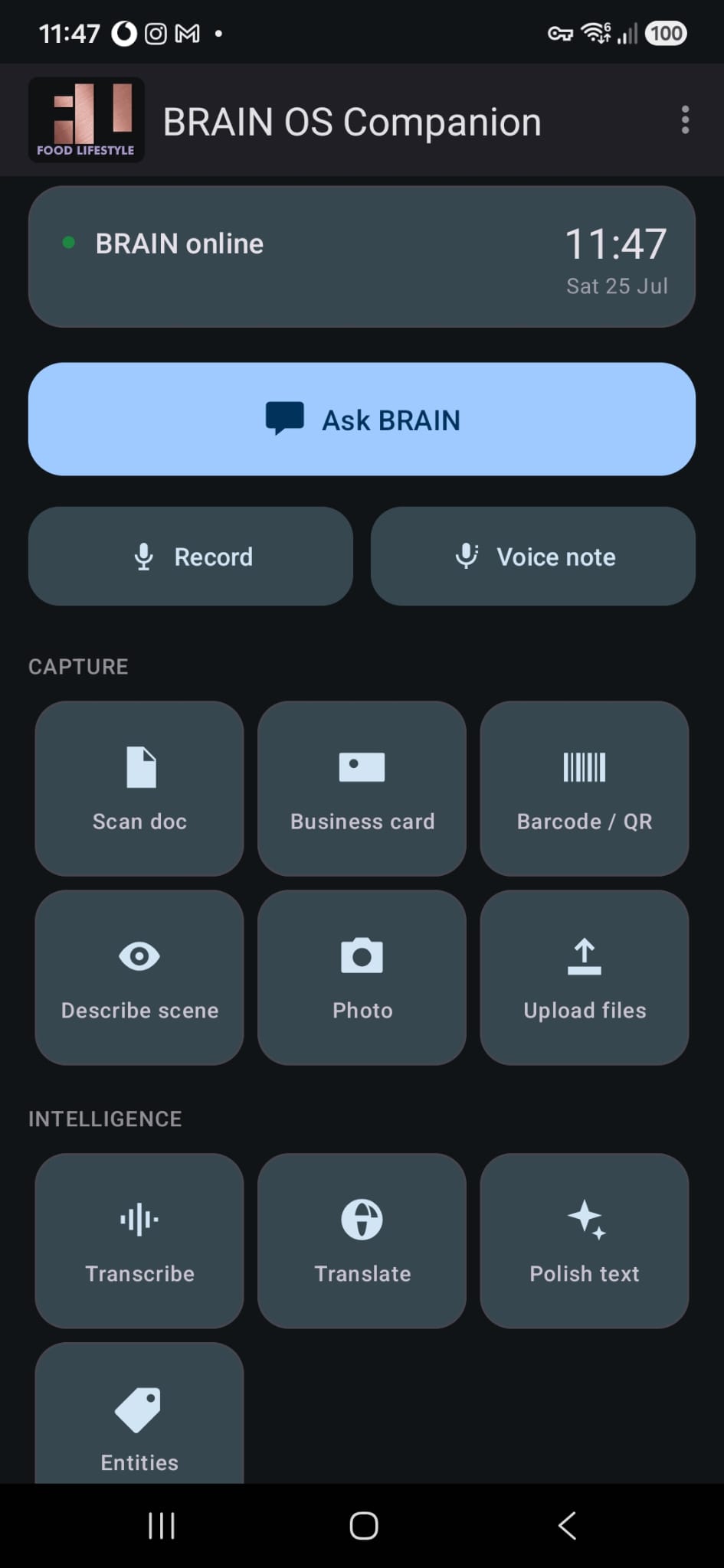
One screen, no menus to learn. It opens telling you whether the system is online, and everything below it is one tap: ask a question, start recording, or capture what is in front of you. Whatever you capture lands in the same memory the agents read — so a photograph taken in a kitchen at eleven in the morning is available to a layout question that afternoon.
Capture
Intelligence
Ask & record
Decisions & control · new in version 4
Claude connector · for client teams
The client's team connects BRAIN OS to its own Claude — the desktop app or claude.ai — and a Project Cockpit appears pinned in the sidebar, next to the conversation. It shows one project only, always live, and every module is designed for the day-to-day of a food business project: the kitchen, the suppliers, the inspections, the menu, the opening date. The reasoning runs on the client's own Claude plan; the method, the data and the judgement stay with Paolo Barichella and FLC.
Zoning review — ground floor, rev. 03The FLC zoning review is the source of truth for layout discussions.
Set up once, in three steps
Built for client teams
The page holds no data: it reads everything live, with each person's permissions.
Creating, assigning or closing a task, uploading a file, sending a request: Claude asks first, and FLC is notified.
FLC activates modules member by member, and can switch any of them — or the access — off at any time.
The connector is part of the BRAIN OS operating method: it is activated only within an advisory mandate, module by module, and quoted with it. It is not sold on its own.
How BRAIN OS is engaged
BRAIN OS was not built to be sold as software, and it never will be: no licences, no code, no self-service. It is the strategic asset behind Paolo Barichella's advisory — the Infinite Brain that keeps twenty-four years of method, projects and precedents working at once. Clients reach it in three layers, and the operating method is quoted separately from the advisory.
Paolo's judgement, signed deliverables, the Advisory Board of the Luminaries, the decisions that matter. BRAIN OS works in the background, making every answer faster and better grounded. Every engagement starts here.
The client's team works inside the system: the Cockpit, the five-level project engine, shared project documents, and modules such as Studio CAD Architect and Compliance. It sits on top of the advisory — never on its own — and is sized to the project: a single venue, a structured team project, or a multi-site format.
When what is created together multiplies, the value is shared: a royalty on each new opening of a format, a royalty on the sales of a product, or — in research and development — a royalty on the intellectual property or a stake in the venture.
Studio CAD Architect can be activated only for the months of layout design; a one-off onboarding sets up the Cockpit, the shared archive and the project notebooks. Every proposal is written for the project, never sold by the day.
Demo
The assistant on this website is a small public window on BRAIN OS: a language model running on our own server, answering only from Paolo's public profile, in your language. It is not software for sale: BRAIN OS is the strategic asset behind Paolo Barichella's advisory, and its operating method is quoted as a separate service, on top of the advisory.
Access
BRAIN OS is not open for self-service. It runs on client mandates, alongside Paolo, under NDA. If you are considering a project where it would make a difference, describe it.